Phishing isn’t just emails anymore. Today’s attackers use AI-generated phone calls, deepfake videos, sophisticated text messages, and perfectly crafted emails. The technology behind these attacks has become remarkably advanced—AI can now generate videos of people and scenarios that look completely real.
Example: AI-generated video showing how realistic modern generative AI has become. This entire scene was created by AI—no real filming involved.
Despite this technological sophistication, every phishing attack has one critical weakness: it needs you to act before you think, by pausing you nearly render the attack a failure.
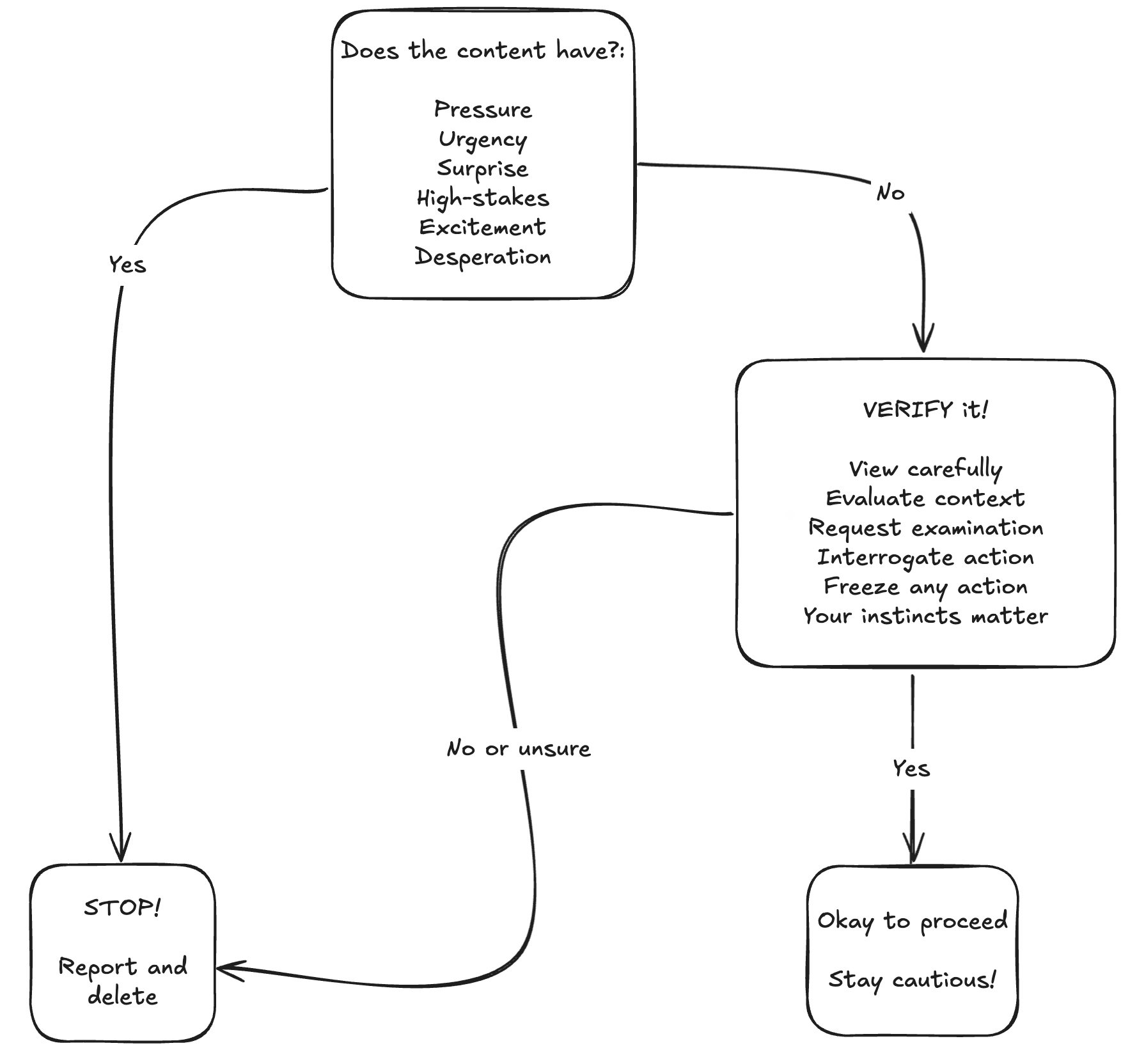
This guide introduces two frameworks that work together: PUSHED helps you recognize emotional manipulation, and VERIFY provides a systematic validation process.
Why Traditional Training No Longer Works
Traditional phishing training focused on spotting obvious mistakes: typos, suspicious links and so on. This worked when attackers were unsophisticated. But modern attacks are different. They are more psychological than ever, using studied theories and practices to their benefit of engineering an interaction.
Professional criminal organizations now run phishing operations with the same AI/LLM tools you use to edit your messages, even have staff such as graphic designerss and social engineers. AI voice cloning can perfectly replicate voices. So much so that a in a documented case attackers used deepfake video calls showing fake executives to authorize a fraudulent wire transfers. Other avenues these attackers use is to compromise a legit email account, meaning phishing comes from the legitimate addresses that pass all authentication checks, where standard security training will fall short.
The old approach assumed attackers would make mistakes you could spot. Sophisticated attackers don’t make those mistakes. We need a systematic method that works even when communications appear completely legitimate.
The PUSHED + VERIFY Framework
PUSHED: Recognize Emotional Manipulation
Phishing attacks exploit emotions to bypass critical thinking. Before examining technical details, start off by asking yourself: “Is this message trying to manipulate how I feel?”
PUSHED stands for:
Pressure / Polite Predation - Two sides of the same manipulation. Pressure is direct: demanding immediate action, authoritative language, threats of consequences. Polite predation is subtle: excessive apologies, elaborate courtesy, making you feel obligated to help. Both create social pressure to comply without questioning.
Urgency - Anything that restricts reaction time. Examples being:
- “Act now or lose access to your account.”
- “You have 2 hours to respond.”
Legitimate organizations rarely operate on such compressed timelines.
Surprise - Anything that is out of the ordinary and unexpected. This can range from many different avenue like a surprise request from upper management. Particularly, communications comes through unusual channels. The goal that the attacker has in mind is the element of surprise because it destabilizes your normal pattern recognition.
High-stakes - Threats of account closure, legal action, security breaches, financial loss, large monetary exchanges. The primary goal is to instill fear, to put something important on the line. Examples being strongarming you by threatening to have proof of you that would cause social damage. However, the subtely has a wider range than people think. Attackers can leverage the victims lack of knowledge to manipulate in a way that causes these high-stakes. I’ve seen this in the field where the attackers have an idea of where the victims are located or make an educated guess, and by building credibility by listing physical locations nearby, manipulating the victims perception of physical safety. Attackers know fear of serious consequences drives people to act quickly without verification.
Excitement - Exclusive or to-good-to-be-true opportunities. Unfortunately, it could be as cruel as pretending to be a recruiter for your perfect dream job. Positive emotions bypass skepticism just as effectively as fear. Meaning it’s an emotional manipulation tactic to get you to act now without thinking and verifying.
Desperation - Emergency situations, pleas for help, framing scenarios where you’re someone’s only hope. An example: someones job is on the line and they are on thin ice, one more mistake means being fired, but since they’re a single parent this means a negative affect on their kid. Desperation does have a wide range, the example was a bit on the higher end but it can subtle, such as having to do something that isn’t pleasant but framing it as “its just protocol”, “sorry, it’s what upper management wants” to “I know this sucks, I have to do it though”. What the attacker is manipulating empathy and our natural desire to help others.
When you feel PUSHED—when a message triggers these emotions—that’s your signal to slow down and verify, not speed up.
A phishing attack could use a few or all of these indicators. However, sophisticated attacks may delay using tactics until trust has been built, which will bypass any internal alarms. But irregardless of the timeline, if a message or statement that is being made hits this framework, it meets the threshold to VERIFY.
VERIFY: Systematic Validation
Once you’ve identified potential emotional manipulation, use VERIFY to systematically validate before acting. It’s important to note that this framework was built to be applicable to all communication channels as well as practiced sequentially.
How to VERIFY: Detailed Breakdown
V - View Carefully
Examine who’s contacting you and how they’re doing it. Don’t just glance—actively and consciously look for inconsistencies.
For emails: Check the actual email address, not just the display name. Attackers use lookalike domains: “yourcompany-support.com” instead of “yourcompany.com,” or “microsft.com” instead of “microsoft.com.” These similar-looking domains are easy to register and hard to spot without careful examination. However, in sophisticated attacks the attacker may perform a homograph attack. In complex cases, the attacker may use a Cyrillic O instead of the traditional English O. It is indistinguishable, however, it is assigned a different code that indicates it being Cyrillic vs. English. This does appear as it should to the victim or hovering over the link, but within the global domain system it is interpreted differently.
For phone calls: Caller ID is easily spoofed as the phone system was built with inherent trust. Are you expecting the call? Does the number match what you’d expect? More importantly, does this communication channel make sense and follow the pattern?
For voice: AI-generated voices can be remarkably convincing, but they often have subtle tells. Listen for unnatural pauses, overly consistent pacing (no natural variation) or lack of breathing sounds. If a voice sounds too perfect or something feels slightly off, that is likely your uncanny valley detection firing, verify the identity through another channel.
For video: Guidance on detecting AI-based videos will be ongoing and evolving as the technology continues to rapidly change. As of right now, similar to voice, you may have an uncanny valley feeling. Humans make micro-mistakes when speaking and have pauses as we think of what we’re going to say next. We have a complex body language where a lot of communication is done, social signaling to cognitive/instructional scaffolding. These are things to note when attempting to identify if a video is AI or not.
Note: Deepfake videos often struggle in real-time rendering when objects move around the tracked object. Such as, a hand moving past a real-time deepfaked face. Knowbe4 recently identified North Korean hackers that posed as westerners. During the live interview, they used deepfake faces in real-time to trick into believing the pretext.
E - Evaluate Context
Context is your strongest defense. A lot of attacks fail when you simply ask: “Does this make sense given what I know?”
Expected vs. unexpected: Were you waiting for this package delivery notification? Did you request a password reset? Expected communications have context; unexpected ones deserve scrutiny.
Communication channel: Does this organization normally contact you this way? Your bank might email you, but do they normally text? Does your boss usually make financial requests via text message, or do they use your company’s approval system?
Relationship and role: Does this person normally contact you about this topic? Is this request part of your job responsibilities? Have you ever interacted with this vendor before?
Timing: Why is this coming through at 11 PM? Why did this arrive while the supposed sender is on vacation? Strange timing could indicate something’s wrong.
R - Request Examination
What exactly are they asking you to do? Is this an unusual request? Examine whether the request aligns within procedures and legitimate organizational policies.
It’s good to also ask yourself what is the data or action they’re requesting you to do.
What to examine:
- Is this request unusual for this sender or organization?
- How sensitive is the information or action they’re requesting?
- Does this follow documented procedures and policies?
- Are they asking you to circumvent normal processes?
I - Interrogate Action
Challenge the urgency. Ask critical questions about why this supposedly needs to happen right now.
Questions to ask yourself:
- Why must this happen immediately? What’s the actual reason?
- What realistically happens if I take 10 minutes to verify?
- Can I confirm this deadline through official channels?
- Is the stated threat realistic and verifiable?
- If I push back, what happens? Do they get upset or continue to push?
F - Freeze Action
Stop before you act on the request. This is the most critical step because phishing only succeeds if you comply with the request.
What to freeze:
- Don’t click links in unexpected messages
- Don’t download attachments you weren’t expecting
- Don’t share passwords, MFA codes, or sensitive information
- Don’t transfer money outside documented procedures
- Don’t grant system access without proper verification
- Don’t call phone numbers provided in suspicious messages
How to freeze effectively:
- Use power phrases: “I need to verify this through official channels first”
- Buy time: “Let me check with my manager” or “I’ll submit a ticket to IT”
- Trust procedures over urgency: Security processes exist for good reasons
- Remember: Saying no or delaying isn’t rude—it’s responsible
Any legit organization should 100% understand if you’d like to do your own research to verify the authenticity. Often, attackers will get frustrated if you are close to completing their objective and you pause to start to ask why. Use that to your benefit.
Y - Your Instincts Matter
Trust your gut. Humans are exceptional pattern-recognition machines, our brain is so tightly connected to our stomach through the gut-brain axis. Your subconscious often detects problems before your conscious mind can articulate them.
Trust your instincts when:
- The tone feels wrong (too formal, too casual, oddly pressured)
- The timing seems suspicious (after hours, during vacation, odd urgency)
- The context doesn’t align (wrong channel, wrong person, wrong process)
- The pattern does not match perhaps what you’ve developed with the person or organization
- Something just feels “off” even if you can’t explain exactly why
Your instincts are valid without technical proof. You don’t need to be able to explain exactly what’s wrong to report something suspicious or refuse to comply until you’ve verified.
Example: An email from your colleague asks you to review a document, they’re usually casual and friendly, but this email is strangely formal and stiff. Trust that instinct—message them through a different channel and ask: “Did you just send me an email about a document?”. Taking that extra minute to verify significantly reduces the likelihood of complying to a phishing attack and has a great return on investment, all due to pausing on trusting implicitly.
Real-World Attack Scenarios
Understanding how PUSHED and VERIFY work together becomes clearer when you see them applied to actual attack scenarios. These include documented cases where sophisticated attacks succeeded against real organizations.
Case Study: Ubiquiti Networks (2015)
What Happened: In 2015, attackers successfully stole $46.7 million from Ubiquiti Networks through a business email compromise (BEC) attack. The attackers impersonated executives and used forged email correspondence to convince finance employees to wire money to attacker-controlled accounts. They maintained the deception over time, building trust and using knowledge of internal processes to make their requests appear legitimate.
Why It Worked:
- Sophisticated impersonation of executives using compromised or spoofed email accounts
- Knowledge of company procedures and organizational structure
- Gradual trust-building over multiple communications
- Pressure from apparent authority figures (executive to an individual contributer (IC) usually carries implicit trust)
- Requests that seemed to follow normal business processes
How PUSHED + VERIFY Would Help: Even though the requests appeared legitimate, applying VERIFY would have caught the fraud. Verifying financial requests through several different channels, confirming through formal approval processes—would have increased the chance of exposing the deception.
Case Study: Arup Deepfake Scam (2024)
What Happened: In Hong Kong, attackers used deepfake video technology to impersonate a company’s CFO and other executives in a video conference call. The finance employee believed they were on a legitimate video call with multiple senior executives. Based on instructions given during this deepfaked video conference, the employee authorized transfers totaling $25 million to attacker-controlled accounts.
Why It Worked:
- Deepfake video technology convincingly replicated executives’ faces and voices
- Multi-person video call created apparent legitimacy (all were deepfakes)
- Visual confirmation bias—seeing someone on video created false confidence
- Authority pressure from apparent senior executives
- Real-time interaction made the deception harder to detect
How PUSHED + VERIFY Would Help: Despite seeing executives on video, the request should have been verified through several established financial approval processes. High-stakes financial transfers require documented process of authorization regardless of who appears to request them. A simple follow-up through another official channel or two could have immediately exposed the fraud. Process verification must override even convincing visual evidence.
Scenario: IT Support Call
Let’s put this into practice.
Your phone rings, caller ID shows “IT Support.” The caller says: “We detected malware on your laptop—it’s actively stealing data right now. We need remote access immediately to clean it, or we’ll have remotely wipe your computer. Can you download our screen sharing software?”
PUSHED Analysis:
- Urgency: “immediately,” “right now,” “actively stealing”
- High-stakes: Data loss threat, losing access to your work
- Desperation: Framed as IT needing to act urgently to protect you
VERIFY Analysis:
- View: Caller ID says “IT Support” but that’s easily spoofed, anyone can claim to be IT Support. Perhaps at your company they call it something else, or you don’t recall signing up for Microsoft technical support before.
- Evaluate: The computer hasn’t exhibited any strange behavior before, and you haven’t installed or opened any recent software/file. Phone numbers are widely leaked and can be easily found online, so calling isn’t oddly suspicious. But, within a company what is the most likely communication channel? If it’s someone claiming to Microsoft technical support, have you ever signed up for that?
- Request: Grant remote access via third-party software downloaded.
- Interrogate: Why not through the normal helpdesk if the company has one? If this were real, what happens if you take 5 minutes to verify by reaching out through the official communication channel? Or, perhaps its “Microsoft” technical support, were you browsing a website then something popped up saying you have to call now?
- Freeze: Don’t download anything. Don’t grant remote access. What happens if you ask to take 5 minutes? Say you will take some time to verify the request and communication.
- Instincts: You may feel reluctant to give access. Granting access to your computer is personal or sensitive, containing lots of your data and access to your accounts.
Correct Action: Say politely: “I’ll contact the IT helpdesk directly about this.” Hang up. Submit a ticket through your normal IT portal or call the helpdesk using the internal directory number. Report the suspicious call to security. This is a vishing attack trying to install malware or steal credentials.
Modern Threats: Special Considerations
AI-Generated Content
AI voice cloning can create perfect voice replicas from just seconds of audio. Anyone with publicly available audio—conference talks, earnings calls, videos posted online—can have their voice cloned. The technology is now widely accessible and frighteningly effective.
Increase reliance on context and process verification. If a voice call requesting action doesn’t match normal communication patterns, verify through a different channel regardless of how convincing the voice sounds. For high-stakes requests like financial transfers, consider establishing verbal authentication protocols with key colleagues—agreed-upon phrases or questions that verify identity.
Compromised Accounts
Sometimes phishing comes from legitimate accounts that have been hacked. Your colleague’s real email account sends you a link. Your friend’s social media shares something suspicious. A vendor’s actual email contains an unusual invoice.
This is particularly dangerous because the source appears completely legitimate—it passes authentication and passes email portion of viewing the domain for correctness. The attacker may even have access to previous communications and can reference real projects, only building the trust.
Pay attention to unusual requests, writing style changes, or communications that don’t match normal patterns. When in doubt, contact the person through a different channel: “Did you just send me [description]?” Report suspected compromises immediately—if their account is hacked, they need to know.
Multi-Stage Attacks
Sophisticated attackers sometimes conduct operations over extended timeframes. Stage one might be innocuous: someone reaches out claiming to be from a partner organization, asks basic questions, has a perfectly normal conversation. They may have done their homework, so name-dropping or claiming to be a known business could be used to build implicit trust. This is reconnaissance—gathering information about you, your role, your organization’s processes, who you work with.
Later, armed with this information, they craft a much more sophisticated attack that references real people, real projects, real organizational knowledge. The trust built in earlier interactions makes this second-stage attack more convincing, furthering any suspicion.
Bottom Line
By applying PUSHED and VERIFY to communications, even seemingly innocent ones, you will stop these campaigns in its track. Be cautious about sharing personal or organizational information. Remember that attackers may reference real information to build credibility—just because they know accurate details doesn’t mean they’re legitimate.
Remember: Everyone makes mistakes. Sophisticated attacks are designed to fool people. Reporting quickly is professional and responsible. Hiding it only lets attackers operate undetected and potentially compromise more systems.
Key Takeaways
When you feel PUSHED, stop and VERIFY before you reply.